How to understand a new codebase fast
Written by GitDiagram. Checked on (sources).
To understand a new codebase fast, get a map of its main parts before you open any file, then follow one real request or command through the code, run it, and read only what your first task touches. For a GitHub repository the map takes seconds: replace hub with diagram in its URL (github.com/posthog/posthog becomes gitdiagram.com/posthog/posthog) for an architecture diagram with every part linked to its code. Your editor, a coding agent and the people on the team then fill in what the map leaves out.
A first-week workflow
- Get the map. Open the repository's diagram and read the short overview above it. Note the four or five groups, which parts sit on the main path, and the words the project uses for its own parts: they reappear in folder names. Treat the map as a list of places to look, not as the truth about every file.
- Read the README and the contributing guide. They say what the project is for, how to run and test it, and how the team works. Many repositories keep the contributing guide in
CONTRIBUTING.md; newer ones also have anAGENTS.mdorCLAUDE.mdwritten for coding agents, which is often the most up-to-date description of the layout. - Follow one path end to end. Pick something a user does (an API request, a CLI command, a button) and trace it from its entry point through the parts on the map. Go-to-definition and find-references do most of the work, in your editor or in the browser with GitHub's code navigation.
- Run it and change something small. Run the tests, start the app, add a log line on the path you traced, or break something on purpose and see which test fails. Code you have run is much easier to remember than code you have read.
- Ask with context. Ask a coding agent in your checkout narrow questions ("where is a session started?"), and ask the team which parts of the map are wrong, old or about to change. A
CODEOWNERSfile, when there is one, says who owns each folder. - Write down what you learned. Correct the map as you go: export its Mermaid code, fix the boxes that were wrong and keep it with your notes. It becomes the onboarding document the next person needs.
Example: PostHog's codebase on day one
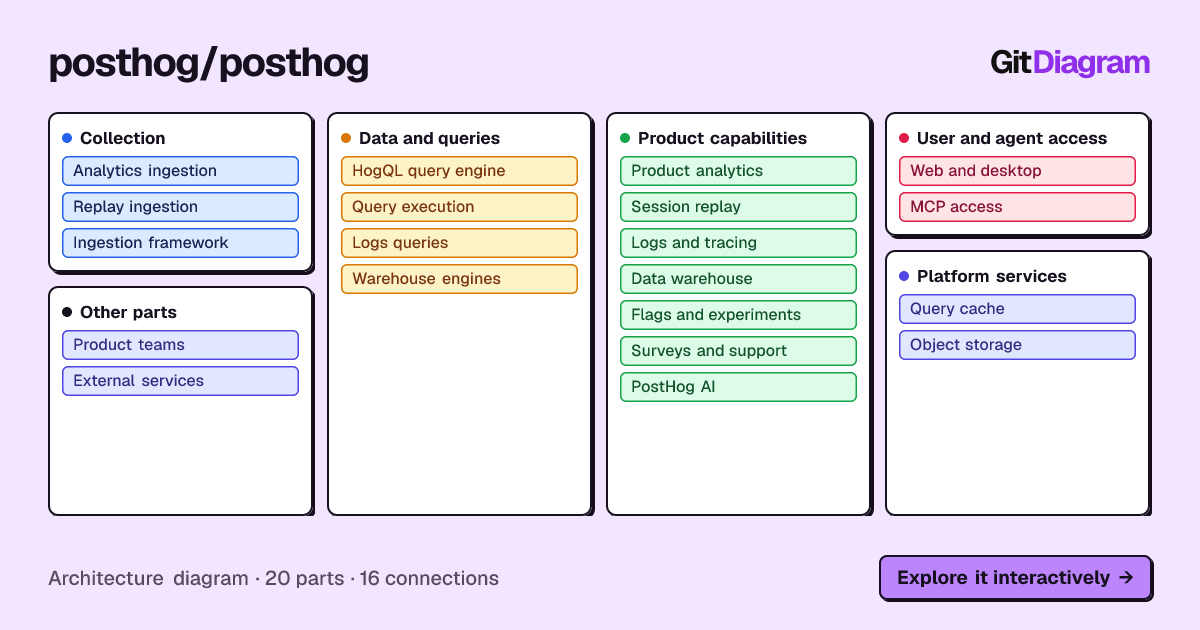
PostHog's diagram (made 2026-10-14) has 20 parts in 5 groups: Collection, Data and queries, Product capabilities, User and agent access, and Platform services, with 16 labeled connections. Two things a newcomer learns from it in a minute: event ingestion is TypeScript under nodejs/src/ingestion/ (analytics and session replay both build on one shared ingestion framework), while queries run in Python, with posthog/hogql_queries/query_runner.py handing results to a query cache that stores large results in object storage.
The overview is also honest about its gaps: its connections come only from the README and the sampled files, so it does not claim an end-to-end pipeline it has not seen. That tells you where to start reading: the query runner, the ingestion framework, and whatever connects them.
When another tool fits better
For written explanations of each part and a chat about the code, DeepWiki writes a wiki of public repositories. For exact answers such as every caller of a function across many repositories, use Sourcegraph or your editor. For a focused question about code you have checked out, including private or uncommitted code, ask a coding agent such as Copilot, Claude Code or Cursor; GitHub's own tutorial shows how with Copilot.
GitDiagram's diagram is made by an AI model from the file tree, the README and up to 12 source files. It is a map of the important parts, at most 34 of them, not a complete dependency graph: it can simplify or leave things out, every linked path is checked against the real repository, and it shows the repository as it was when the diagram was made (Regenerate makes a fresh one).
Questions
It's my first week and the codebase is huge. How do I get a mental model fast?
Get a map of the main parts first (for a GitHub repository, replace hub with diagram in its URL), trace one real request through it, run it locally, and ask the team which parts of the map are wrong. Read deeply only what your first task touches.
How do I get to know an open source project before my first contribution?
Read its contributing guide, look at the architecture diagram to find the part your issue is in, then read recently merged pull requests in that part: they show the review style and where the tests go.
Sources
Checked on . Products change: if something here is out of date, open an issue.