How to understand and document a legacy codebase
Written by GitDiagram. Checked on (sources).
With a legacy codebase and no documentation, work from the outside in: get a map of the main parts, find where execution starts and what data it keeps, read the history before the code, and write down what you learn as you go. A diagram generated from the repository is a fast first map; for a GitHub repository, replace hub with diagram in its URL. Before you change anything, get an exact import graph and tests that pin the current behavior, because a generated map simplifies.
A workflow that holds up
- Get a first map. Open the repository's diagram and its overview. The Markdown version (add
.mdto the page URL) also lists the main entry points and, for each connection, the file it was read from. - Find where it starts and what it stores. Look for the entry points (a
main, the server setup, route tables, scheduled jobs) and for the data: the database schema and migrations usually describe the business better than any comment. - Read the history.
git log --follow <file>shows how a file got here, andgit blameshows which commit wrote a line; the commit messages and linked issues often explain the odd parts. - Get exact dependencies before you refactor. A generated diagram is a map, not a proof. Before moving code, draw the real import graph with dependency-cruiser or Madge (JavaScript),
pydeps(Python) or your IDE, and add rules in CI that stop new cycles. - Pin the behavior with tests. Write tests that record what the code does today, right or wrong, around the part you will change. They tell you when a refactor changed behavior.
- Write the architecture down next to the code. Commit a
docs/architecture.mdwith a Mermaid diagram (the exported code is a first draft to correct), or a C4 model for something more formal. To keep a README picture from going stale, use GitDiagram's README picture: it shows the latest diagram after each regeneration.
Example: a 20-year-old codebase
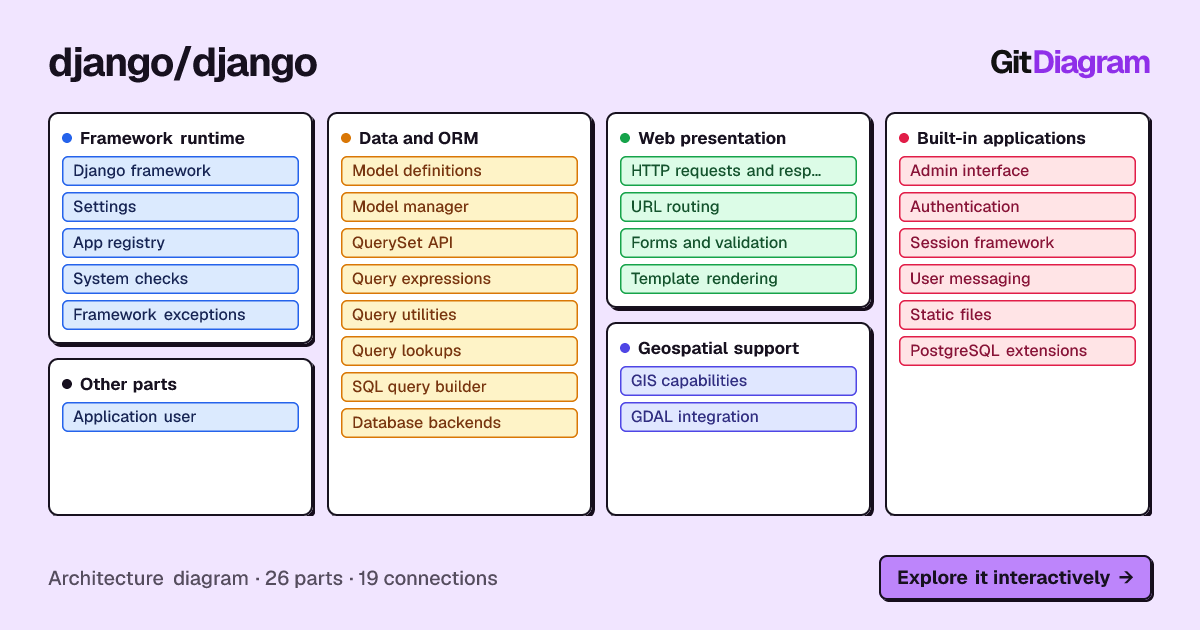
Django has been developed in public since 2005, which makes it a good stand-in for a large, layered codebase. Its diagram (made 2026-10-28) has 26 parts in 5 groups (Framework runtime, Data and ORM, Web presentation, Built-in applications, Geospatial support) and 19 connections. It traces the ORM chain from the model manager (django/db/models/manager.py) to the QuerySet API (query.py) to the SQL query builder (sql/query.py), and shows that the admin builds its queries through the QuerySet API (django/contrib/admin/views/main.py).
Each of those connections names the file it was read from, so you can check it in a minute. The overview also says which connections it left out because the sampled files did not show them; those are the places to read next.
When another tool fits better
For a written explanation of each part, DeepWiki generates a wiki of public repositories. For exact answers across a large codebase, such as every caller of a function, use Sourcegraph or your IDE. For a maintained, formal model the team owns, Structurizr keeps C4 diagrams as code.
GitDiagram's diagram is made by an AI model from the file tree, the README and up to 12 source files. It is a map of the important parts, at most 34 of them, not a complete dependency graph: it can simplify or leave things out, every linked path is checked against the real repository, and it shows the repository as it was when the diagram was made (Regenerate makes a fresh one).
Questions
I inherited a legacy codebase with no documentation. Where do I start?
Get a generated map of the main parts, find the entry points and the database schema, read the history with git log and git blame, and write tests around anything you plan to change before you change it.
Our architecture docs are always out of date. Can the diagram come from the code?
Yes. GitDiagram generates the diagram from the repository, and its README picture always shows the latest diagram; regenerate it after a big change. Keep any hand-written explanation next to it in the repository so it is reviewed with the code.
Sources
Checked on . Products change: if something here is out of date, open an issue.