How to get an architecture diagram of a private GitHub repository
Written by GitDiagram. Checked on (sources).
To diagram a private GitHub repository, give the tool read-only access to that repository and nothing else. On GitDiagram, choose Private Repos in the header, then Continue with GitHub and pick only the repositories it may read, or paste a fine-grained personal access token limited to that repository with Contents set to Read-only. The diagram is stored privately and can be read only with the same access. If the code must not be sent to any outside service, use a tool that runs on your own machine instead.
Step by step
- Open GitHub access. Choose Private Repos in GitDiagram's header. It offers two ways in: signing in with GitHub, or a token.
- Grant read access to only what you need. Continue with GitHub gives GitDiagram read-only access to only the repositories you pick, and you can remove it at any time in your GitHub settings. With a token instead, use Create token on GitHub: it opens GitHub's fine-grained token page with the name, a 30-day expiry and Contents: Read-only already filled in; choose the owner and select the repository. Metadata read access is added by GitHub automatically. An organization may need its admin to approve the token.
- Make the diagram. Open
gitdiagram.com/{owner}/{repo}as you would for a public repository. To make the diagram, the file tree, the README and up to 12 source files are sent to the AI provider that writes it. - Know where it is kept. Your sign-in or token is kept in a protected browser cookie for up to 30 days and sent with your own requests; it is never saved on GitDiagram's servers. The diagram is stored in a separate private location that only the same access can read. It does not appear in Browse, in the Markdown pages for agents or in the MCP server, which serve public repositories only.
- Remove access when you're done. Disconnect in the same dialog, and revoke the token or the app's authorization in your GitHub settings.
What you get
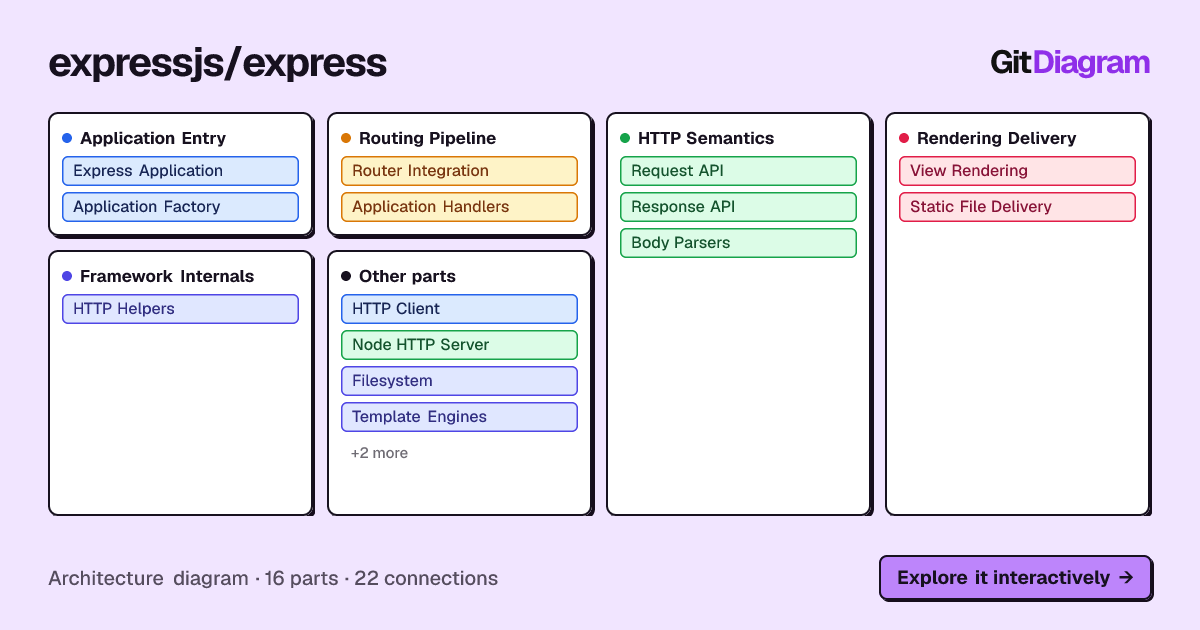
A private repository's diagram looks and works like any public one, such as Express's: 16 parts in 5 groups with 22 labeled connections, each part linked to its file on GitHub, a written overview, and Export for PNG or Mermaid. Only the link to it stays private.
When the code can't leave your machine
Import-graph tools run entirely on your computer: dependency-cruiser or Madge for JavaScript and TypeScript, pydeps for Python, and the dependency diagrams in JetBrains IDEs. They show every import rather than an overview, but nothing is uploaded. Coding agents such as Claude Code or Copilot can draw a diagram from your checkout too, though they send code to their own model provider.
GitDiagram is open source under the MIT license, so a team can also run it on its own infrastructure with its own AI provider key, and choose where the code goes.
GitDiagram's diagram is made by an AI model from the file tree, the README and up to 12 source files. It is a map of the important parts, at most 34 of them, not a complete dependency graph: it can simplify or leave things out, every linked path is checked against the real repository, and it shows the repository as it was when the diagram was made (Regenerate makes a fresh one).
Questions
Does GitDiagram store my GitHub token?
No. It is kept in a protected cookie in your browser for up to 30 days and sent only with your own requests; it is never saved on GitDiagram's servers.
Can other people see my private repository's diagram?
No. It is stored apart from public diagrams and can be read only with the same GitHub access that made it. It is not listed in Browse or served to agents.
Sources
Checked on . Products change: if something here is out of date, open an issue.