How to give an AI coding agent a map of your repository
Written by GitDiagram. Checked on (sources).
Coding agents get lost in large repositories because each session starts without knowing how the code is organized. Give them a short written map they load every time: a CLAUDE.md for Claude Code, an AGENTS.md for Codex and other agents, or a Cursor rule, naming the main parts, where they live and how they connect. To write it quickly, start from a generated architecture diagram: GitDiagram's Markdown version (gitdiagram.com/{owner}/{repo}.md) lists every part with its path and every connection, and its free MCP server lets an agent fetch the diagram itself.
Step by step
- Generate the map. Open
gitdiagram.com/{owner}/{repo}.mdfor a public repository. It has the overview, the main entry points, the Mermaid source, every part with its GitHub link, and every connection. - Put the essentials in the agent's instructions. Claude Code reads
CLAUDE.md(its/initcommand writes a first one by exploring the code); Codex and many other agents readAGENTS.md; Cursor reads rules from.cursor/rules. Add the main parts with their paths and the main path between them, in a few short lines. A long file costs context in every session. - Or let the agent fetch the diagram. Connect GitDiagram's MCP server:
claude mcp add --transport http gitdiagram https://gitdiagram.com/mcpin Claude Code,codex mcp add gitdiagram --url https://gitdiagram.com/mcpin Codex, or agitdiagramentry with that URL in Cursor'smcp.json. Its tools areget_repository_diagram,find_repository_diagramsandget_explainer_video; no sign-in, public repositories only. - Ask the agent for focused views. For one request path or one feature, ask the agent in your checkout to draw a Mermaid diagram. It can read every file, which a whole-repository map can't.
- Keep the map current. Update the instructions file in the pull request that changes the architecture, or regenerate the diagram after a big refactor.
Example: what an agent gets for openai/codex
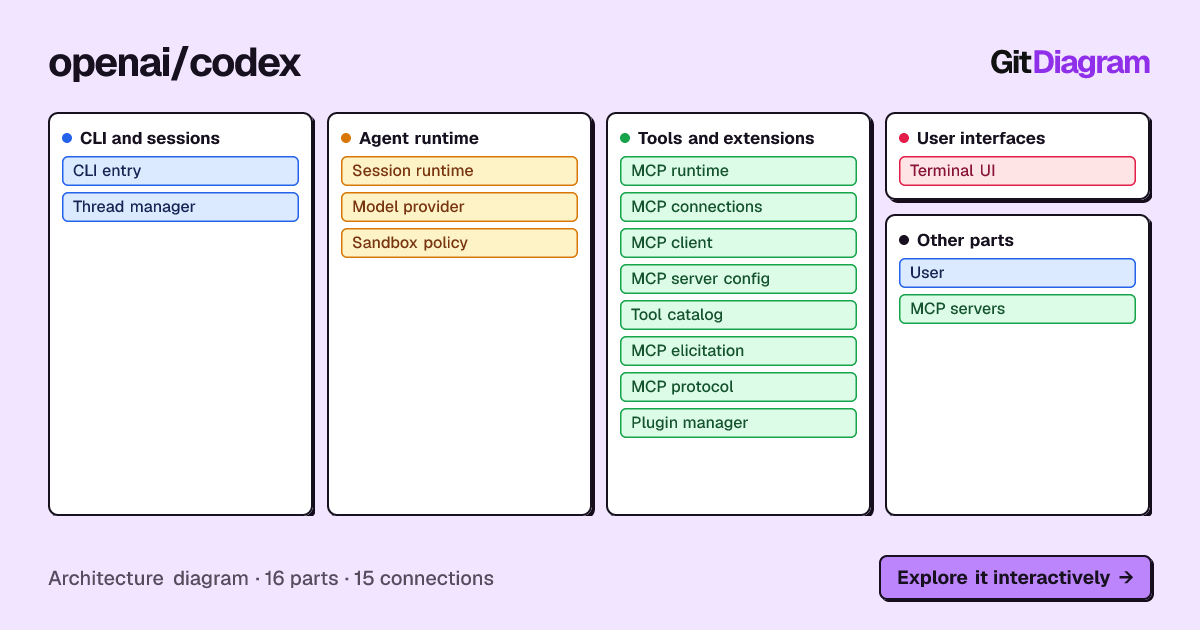
Calling get_repository_diagram for openai/codex (on 2026-11-09) returned the stored diagram from 2026-11-06: 16 parts in 4 groups (CLI and sessions, Agent runtime, Tools and extensions, User interfaces) and 15 connections, each part with its path. An excerpt of the Mermaid it returned is below. Several arrows are dashed. In GitDiagram's diagrams a dashed arrow means optional or inferred: strongly implied but not shown in the files that were read. An agent should treat those as hints to check, not facts.
flowchart TD
subgraph group_entry["CLI and sessions"]
  node_cli["CLI entry<br/>[main.rs]"]
  node_thread["Thread manager<br/>[thread_manager.rs]"]
end
subgraph group_agent["Agent runtime"]
  node_session["Session runtime<br/>[session.rs]"]
  node_model["Model provider<br/>[client_auth.rs]"]
  node_sandbox["Sandbox policy<br/>[manager.rs]"]
end
node_user -->|"starts"| node_cli
node_cli -.->|"starts session"| node_thread
node_thread -.->|"manages"| node_session
node_session -.->|"requests model"| node_model
node_session -.->|"applies policy"| node_sandbox
node_session -.->|"uses tools"| node_mcp_runtime
Private repositories
The Markdown pages and the MCP server serve public repositories only. For a private one, make the diagram with GitHub access, copy its Mermaid and overview into your instructions file, and edit them down to what the agent needs.
GitDiagram's diagram is made by an AI model from the file tree, the README and up to 12 source files. It is a map of the important parts, at most 34 of them, not a complete dependency graph: it can simplify or leave things out, every linked path is checked against the real repository, and it shows the repository as it was when the diagram was made (Regenerate makes a fresh one).
Questions
My AI coding agent keeps getting lost in our codebase. How can I give it a map of the architecture?
Put a short map in the file your agent loads every session (CLAUDE.md, AGENTS.md or a Cursor rule): the main parts, their paths and how they connect. Generate a first draft from the repository, for example from gitdiagram.com/{owner}/{repo}.md, and trim it.
Is there an MCP server that gives AI assistants an architecture diagram of a GitHub repository?
Yes. GitDiagram's read-only server at https://gitdiagram.com/mcp (streamable HTTP, no sign-in) returns the stored diagram of a public repository with get_repository_diagram.
Sources
Checked on . Products change: if something here is out of date, open an issue.