How to add an architecture diagram to your GitHub README
Written by GitDiagram. Checked on (sources).
The easiest way to put an architecture diagram in a GitHub README is a Mermaid code block: GitHub draws any code block marked mermaid as a diagram, so the diagram lives in the README as text and changes with the code in pull requests. You don't have to write it from scratch: open your repository on GitDiagram (replace hub with diagram in its URL), choose Export, then Copy Mermaid, and paste the code into a mermaid block. Or choose README picture for a picture of the diagram that opens the interactive version and updates whenever the diagram does.
Step by step
- Make the diagram. Open
gitdiagram.com/{owner}/{repo}for your repository. For a private repository, give it read access first (how). - Pick the form. Export offers four. Copy Mermaid gives editable text that GitHub renders and that shows up in diffs. README picture copies Markdown for an image at
gitdiagram.com/{owner}/{repo}/diagram.pngthat links to the interactive diagram and follows the latest diagram. Download PNG gives a fixed image to commit. README badge copies a small badge that opens the diagram. - Trim it for readers. A README diagram is for someone deciding whether and where to contribute, so keep the groups and the main path and drop the rest. Rename boxes to the words your team uses. The exported code links each box to its file with
clicklines; keep or delete them. - Paste it. Put the code between a line with three backticks and
mermaid, and a closing line of three backticks, usually under an Architecture heading. GitHub renders it in the README, issues, pull requests and wikis. - Keep it current. Edit the Mermaid in the pull request that changes the architecture, or regenerate the diagram after a big change. A README picture updates by itself when the diagram is regenerated.
Example: GitDiagram's own README diagram
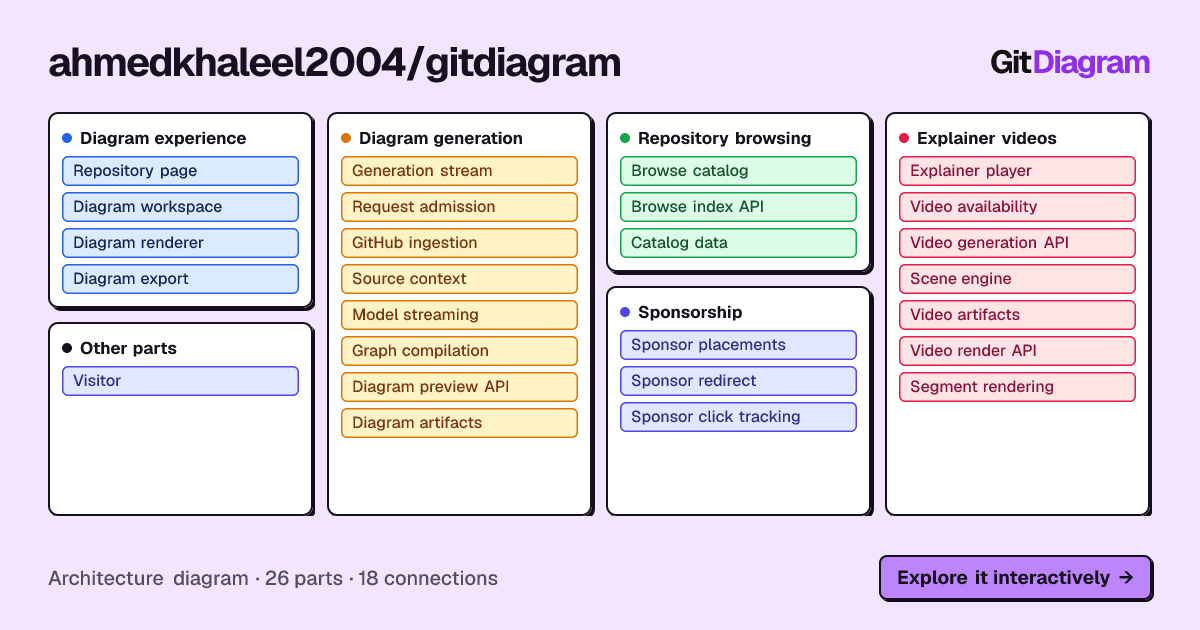
GitDiagram's diagram of its own repository has 26 parts in 5 groups (Diagram experience, Diagram generation, Repository browsing, Explainer videos, Sponsorship) and 18 connections. For a README you would keep one group, as in the trimmed excerpt below: the exported code, with the other groups and the click and styling lines removed.
## Architecture

```mermaid
flowchart TD
subgraph group_generation["Diagram generation"]
  node_stream_api["Generation stream<br/>[route.ts]"]
  node_admission["Request admission"]
  node_github_ingest["GitHub ingestion<br/>[github.ts]"]
  node_source_context["Source context<br/>[source-context.ts]"]
  node_model_stream["Model streaming<br/>[openai.ts]"]
  node_graph_compile["Graph compilation<br/>[graph.ts]"]
end
node_stream_api -->|"admits request"| node_admission
node_stream_api -->|"fetches repository"| node_github_ingest
node_stream_api -->|"fetches sources"| node_source_context
node_stream_api -->|"streams completion"| node_model_stream
node_stream_api -->|"compiles graph"| node_graph_compile
```
Other ways to make a README diagram
Writing the Mermaid yourself gives full control and needs no tool at all. draw.io and Excalidraw are better for a hand-designed picture, saved as an image in the repository. Structurizr keeps a C4 model as code when a team wants a maintained, formal architecture. GitHub Next's repo-visualizer Action draws an SVG of the folder structure on every push, but it shows files and sizes, not architecture, and the repository is archived.
GitDiagram's diagram is made by an AI model from the file tree, the README and up to 12 source files. It is a map of the important parts, at most 34 of them, not a complete dependency graph: it can simplify or leave things out, every linked path is checked against the real repository, and it shows the repository as it was when the diagram was made (Regenerate makes a fresh one).
Questions
How can I add a professional-looking architecture diagram to my portfolio project on GitHub?
Generate a first draft from the repository, then trim it to a few groups with clear names and labeled arrows on the main path, and paste it as a Mermaid block under an Architecture heading. A reader should understand what the project does from the boxes alone.
Does GitHub render Mermaid diagrams in a README?
Yes. A code block fenced with mermaid in a Markdown file, issue, pull request or wiki is drawn as a diagram.
Sources
Checked on . Products change: if something here is out of date, open an issue.