How to understand a large monorepo
Written by GitDiagram. Checked on (sources).
To understand a large monorepo, start from its list of packages, not its files: find which apps run, which shared packages everything depends on, and who owns what, then go deep only in the packages your work touches. The monorepo's build tool draws the exact package graph (nx graph in Nx, turbo run build --graph in Turborepo, bazel query in Bazel). For a picture of what the main parts do and how they talk at runtime, an architecture diagram of the whole repository helps: gitdiagram.com/supabase/supabase maps Supabase's monorepo in 18 parts.
How to approach it
- Find the workspace definition. Look for
pnpm-workspace.yaml,workspacesin the rootpackage.json,nx.json,turbo.json,go.work, a[workspace]table inCargo.toml, or BazelBUILDfiles. It lists every package. Most monorepos split them into things that run (apps/,services/) and shared code (packages/,libs/). - Draw the package graph with the repository's own tool. In Nx,
nx graphopens an interactive graph in the browser andnx graph --focus <project>narrows it to one project. In Turborepo,turbo run build --graph=graph.svgwrites the task graph as SVG, HTML, Mermaid or DOT. In Bazel,bazel query 'deps(//path:target)'lists what a target depends on. These graphs are exact because they come from the build configuration. - Get the runtime picture. A package graph shows who imports whom, not which app calls which service over the network or which job reads which queue. Look for architecture docs in the repository, and open its diagram on GitDiagram for a first picture of the main parts and their connections.
- Find the owners. A
CODEOWNERSfile maps folders to the teams that review them: it tells you whom to ask about each part, and which parts are shared by everyone. - Narrow to your slice. Pick the app you work on and follow only its dependencies (
nx graph --focus, or a Turborepo filter such as--filter=<package>...). Leave the rest of the repository for later.
Example: the Supabase monorepo
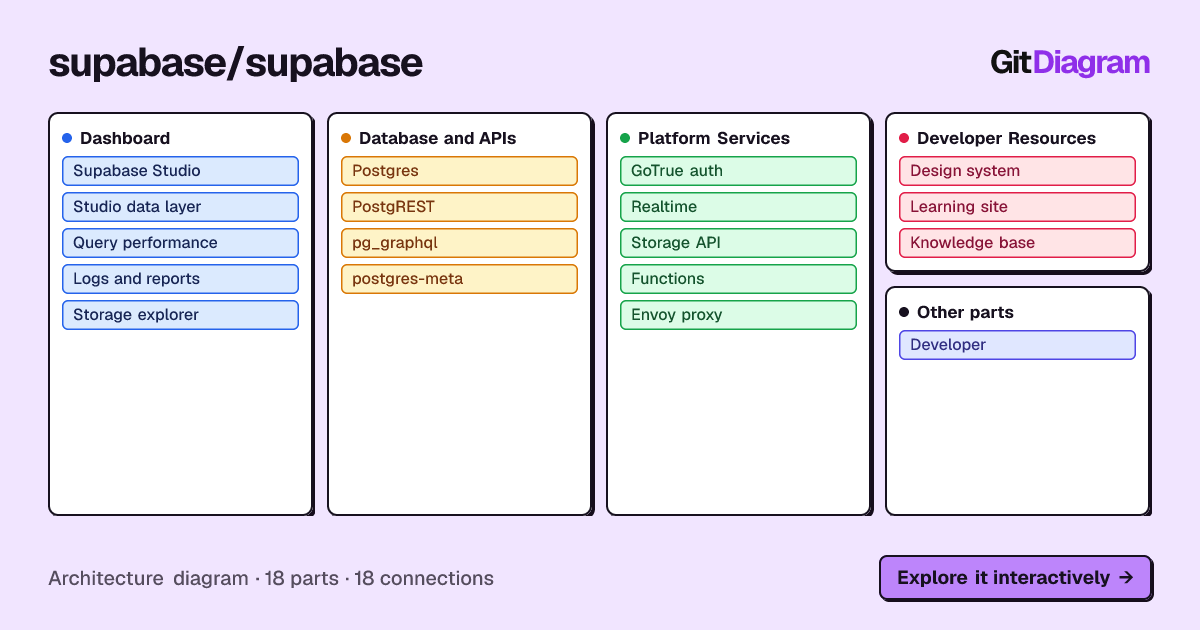
Supabase's repository is a pnpm and Turborepo workspace with 8 folders under apps/ and 16 under packages/ (checked 2026-11-09). Its diagram has 18 parts in 4 groups (Dashboard, Database and APIs, Platform Services, Developer Resources) and 18 connections. The main path: a developer uses Studio (apps/studio), whose data layer (apps/studio/data) queries Postgres; Postgres is served as REST by PostgREST and as GraphQL by pg_graphql and streams changes to Realtime; an Envoy proxy routes requests to PostgREST, GoTrue auth, the Storage API and Functions.
It also shows the limit of one diagram for a monorepo: Postgres, PostgREST and GoTrue appear without links because they are services the README describes, not folders in this repository, and most of packages/ is not on the map. For those, the package graph from the steps above is the better tool.
What a whole-repository diagram can and can't show
GitDiagram diagrams a whole repository with at most 34 parts. In a monorepo with hundreds of packages that makes it a top-level map: which apps and services exist and how they connect. It does not list every package, and a link to a folder inside the repository opens the diagram of the whole repository, not of that folder.
GitDiagram's diagram is made by an AI model from the file tree, the README and up to 12 source files. It is a map of the important parts, at most 34 of them, not a complete dependency graph: it can simplify or leave things out, every linked path is checked against the real repository, and it shows the repository as it was when the diagram was made (Regenerate makes a fresh one).
Questions
I just joined a team with a huge monorepo. What's the fastest way to understand its architecture?
Read the workspace definition to see every package, draw the package graph with the repository's build tool (nx graph, turbo run build --graph, bazel query), get a runtime overview from the architecture docs or a generated diagram, and then focus on the one app you work on and its dependencies.
Can GitDiagram diagram one package inside a monorepo?
Not on its own today: it diagrams the whole repository. For one package, use the monorepo's own graph tool, or ask a coding agent in your checkout to draw that package.
Sources
Checked on . Products change: if something here is out of date, open an issue.