How to review a pull request in a codebase you don't know
Written by GitDiagram. Checked on (sources).
Before reviewing a big pull request in a repository you don't know, find out where it sits: open an architecture map of the repository, mark which parts the changed files belong to, and note what those parts connect to. Then read the description and the tests first, the core change next, and the code around it last. For a GitHub repository the map is at gitdiagram.com/{owner}/{repo}; each part links to its files, so matching the pull request's file list to parts takes a minute.
Step by step
- Read the description and the linked issue. Know what behavior should change, and why, before you look at a line of code.
- Place the changed files on the map. Open the repository's diagram next to the pull request's file list and mark the parts that changed. The connections into and out of those parts are what the change can break.
- Read the tests first. They state the intended behavior in the project's own terms, and missing tests show where to look hardest.
- Read the core change, then its neighbors. Use go-to-definition and find-references, in your editor or with GitHub's code navigation, to check the callers and the parts the map shows next to the change.
- Run it.
gh pr checkout <number>checks the pull request out locally; run the tests and try the behavior yourself. - Ask the owners. A
CODEOWNERSfile says who reviews each folder. Ask them about anything the map or the description leaves unclear.
Example: a FastAPI pull request
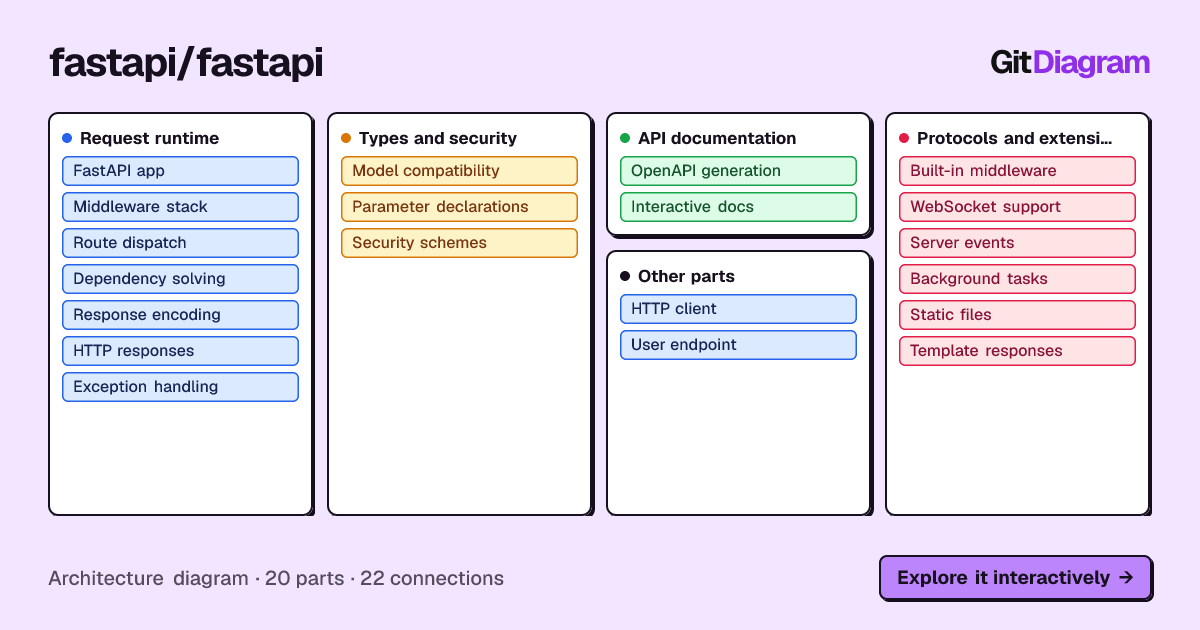
FastAPI pull request #16594, "Apply each parameter model's extra configuration to sibling fields", merged on 2026-10-22, changes 17 files (+823, −495): 3 source files, 8 test files, 5 documentation files and pyproject.toml.
On FastAPI's diagram, two of the three source files are parts of their own: fastapi/dependencies/utils.py is Dependency solving and fastapi/routing.py is Route dispatch (fastapi/dependencies/models.py sits in the same folder as Dependency solving). The diagram connects them: Route dispatch "resolves inputs" through Dependency solving, which "interprets declarations" from Parameter declarations (params.py) and "validates fields" through Model compatibility. So the change sits on every request's path between routing and validation: the places to check are how query, header, cookie and form parameter models are validated, which is exactly what the test file names cover.
Other tools that help
GitHub's own review view lets you filter files, mark them viewed and comment line by line. A coding agent in your checkout can answer narrow questions about the change, such as "what else calls this function?". Sourcegraph finds every use of a symbol across repositories.
GitDiagram's diagram is made by an AI model from the file tree, the README and up to 12 source files. It is a map of the important parts, at most 34 of them, not a complete dependency graph: it can simplify or leave things out, every linked path is checked against the real repository, and it shows the repository as it was when the diagram was made (Regenerate makes a fresh one).
Questions
I have to review a big pull request in a repo I don't know. How do I see how the pieces fit together first?
Open an architecture diagram of the repository, mark the parts the changed files belong to, and look at what those parts connect to. Then read the description, the tests and the change in that order.
Sources
Checked on . Products change: if something here is out of date, open an issue.